Rotoscope, a process invented by Max Fleischer of animated superman fame. Who's son, Richard Fleischer, was a director for many films including Soylent Green (1973) and Fantastic Voyage (1966). Less notable for Million Dollar Mystery (1987) in which famous stunt man Dar Robinson died, and to whom Lethal Weapon(1987) is dedicated.
I just watched Lethal Weapon and A Scanner Darkly back to back and stumbled upon their connection.
Monday, July 23, 2018

Tasker and Secure Settings
I was having problems when introducing new %Variables passing between Tasker and Secure Settings.
I had to clear the cache on Tasker each time to get it to work. Keep in mind that if you have Tasker set as a device administrator, you'll have to disable Tasker being a device administrator before you can clear the cache. Then reapply administrator privileges.
I had to clear the cache on Tasker each time to get it to work. Keep in mind that if you have Tasker set as a device administrator, you'll have to disable Tasker being a device administrator before you can clear the cache. Then reapply administrator privileges.
Saturday, July 21, 2018
More Tasker - Ping an IP
Ever have a server or PC go down that you're counting to have running?
Have Tasker tell you if it's down so you can get it running again.
Here's what you need:
Two android devices, one of which stays home. I have this running on a tablet at home.
Tasker
Secure Settings
AutoRemoteLite
I'm guessing you already have Tasker running, that's no big deal. Secure Settings also isn't hard, download and install. AutoRemote is a bit different though. It has to be installed on both devices. Each device will have it's own unique URL and you can add each devices URL to the "devices" list to allow intercommunication. I pretty much just lucked into it working after messing with it for a while, none of the instructions were too clear on that bit. Classic tech instructions starting at step 7.
Super Important: In Tasker, go to Preferences > Misc > Enable External Access, or none of this will work.
Start a task and set it up like this one. I'm a little overzealous about clearing variables, probably not necessary.
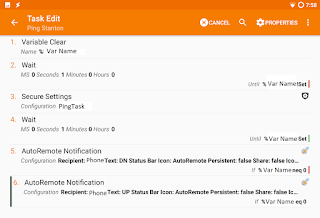
This is what your AutoRemote setup will look like, chose your own variables. You can't have mine. I changed the ping count to 5 to avoid false positives due to WiFi not firing up right away.
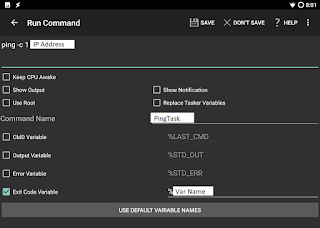
I added this to a profile so it pings every 30 minutes between 8:00 am and 10:30 pm. If my PC goes down, it fires off a notification to my phone. Pretty nifty.
Next step is to add a counter so if my machine is down I don't get notified continuously if I can't fire it back up for a couple days.
Have Tasker tell you if it's down so you can get it running again.
Here's what you need:
Two android devices, one of which stays home. I have this running on a tablet at home.
Tasker
Secure Settings
AutoRemoteLite
I'm guessing you already have Tasker running, that's no big deal. Secure Settings also isn't hard, download and install. AutoRemote is a bit different though. It has to be installed on both devices. Each device will have it's own unique URL and you can add each devices URL to the "devices" list to allow intercommunication. I pretty much just lucked into it working after messing with it for a while, none of the instructions were too clear on that bit. Classic tech instructions starting at step 7.
Super Important: In Tasker, go to Preferences > Misc > Enable External Access, or none of this will work.
Start a task and set it up like this one. I'm a little overzealous about clearing variables, probably not necessary.

This is what your AutoRemote setup will look like, chose your own variables. You can't have mine. I changed the ping count to 5 to avoid false positives due to WiFi not firing up right away.

I added this to a profile so it pings every 30 minutes between 8:00 am and 10:30 pm. If my PC goes down, it fires off a notification to my phone. Pretty nifty.
Next step is to add a counter so if my machine is down I don't get notified continuously if I can't fire it back up for a couple days.
Saturday, June 30, 2018
Scheduled Wake On LAN with Tasker
I've run a bunch of WOL setups, and this one works pretty well.
Ingredients:
Set up your WOL:
In your new WOL app, press the "Add New" button to create a new WOL profile.
Name it something memorable and descriptive, and add the MAC and IP. Leave everything else the same except for the "Send as Broadcast" check box. Check that, it's given me the most success. I recommend testing this bit to make sure you can WOL at all before you start messing with Tasker.
Then, in Tasker, create a new "Send Intent" task. Here's the details:
Now you can add the task to whatever trigger you want, or just run it on demand.
Glad I've written this down now. I had to resurrect my poor boot-looping Nexus 5 to get retrieve this info.


Ingredients:
- Android Phone with Tasker
- WOL app
- PC that you want to wake up
- MAC address of said PC
- IP address of same
Set up your WOL:
In your new WOL app, press the "Add New" button to create a new WOL profile.
Name it something memorable and descriptive, and add the MAC and IP. Leave everything else the same except for the "Send as Broadcast" check box. Check that, it's given me the most success. I recommend testing this bit to make sure you can WOL at all before you start messing with Tasker.
Then, in Tasker, create a new "Send Intent" task. Here's the details:
- Action: com.benfinnigan.wol.widgetlaunch
- Cat: Launcher
- Extra: CPATH: /mnt/sdcard/WoLANWAN/YourWOLProfileNameHere.dat
- Target: Activity
Now you can add the task to whatever trigger you want, or just run it on demand.
Glad I've written this down now. I had to resurrect my poor boot-looping Nexus 5 to get retrieve this info.


Saturday, June 23, 2018
Mission Impossible: Replace existing router with Ubiquiti USG
I've been a home router hobbyist for a while now. Probably goes back to my college days where I was pretty sure I was going to get a Cisco certification. Careers took me a different direction.
I've run stock, tomato, wrt, pfsense, edge, and now I'm giving a USG a shot.
That USG sure wants to be set up fresh on a new network. If you're like me, you already have a lot of in place gear and your own subnet setup that you don't want to mess with. I was able to replace my existing non-Ubiquiti router without having to detach anything other than the router.
I have some Ubiquiti gear on my network, so I was already running the controller software on a desktop PC. I'll tell you what, that USG sure didn't want to adopt. This is what I did and it ended up being easy, just took a while to figure out. In the end, I was as able to adopt all the hardware and not lose my existing Ubiquiti controller setup.
Materials:
I recommend updating the controller software to the latest version so you're running the save version on both computers. The second computer doesn't have to be a laptop, but it makes it easier to keep track of the computers for descriptive purposes.
I was getting hung up on the fact that the USG REALLY wants to be 192.168.1.1. You can't adopt a ubiquiti component that is on a different subnet. By hooking up the laptop, it uses the USG's DHCP and the USG can be adopted.
This worked for me and I'm enjoying the USG so far.
I've run stock, tomato, wrt, pfsense, edge, and now I'm giving a USG a shot.
That USG sure wants to be set up fresh on a new network. If you're like me, you already have a lot of in place gear and your own subnet setup that you don't want to mess with. I was able to replace my existing non-Ubiquiti router without having to detach anything other than the router.
I have some Ubiquiti gear on my network, so I was already running the controller software on a desktop PC. I'll tell you what, that USG sure didn't want to adopt. This is what I did and it ended up being easy, just took a while to figure out. In the end, I was as able to adopt all the hardware and not lose my existing Ubiquiti controller setup.
Materials:
- Desktop running existing controller
- Laptop running a fresh install of the controller software for windows (or your OS of choice)
- USG
- Network cable
I recommend updating the controller software to the latest version so you're running the save version on both computers. The second computer doesn't have to be a laptop, but it makes it easier to keep track of the computers for descriptive purposes.
- Don't take any gear apart yet, you're going to want internet for the following steps
- Make a backup of the existing controller software on the desktop. That can be found in Settings > Maintenance.
- Copy that backup to the laptop
- Turn off wireless on the laptop and disconnect all other network cables to the laptop
- Restore the controller backup to the laptop (you might have to do some initial config beforehand)
- Connect the laptop with the network cable to the LAN1 port on the USG
- Setup the Settings > Networks so that it mirrors your existing network's DHCP config
- Adopt the USG on the laptop
- Backup the laptop controller config, name the file accordingly
- Disconnect the laptop from the USG and put it back on the existing net
- Transfer the new backup to the desktop and restore it
- Swap out your old router for the USG
- Give everything a restart for good measure
I was getting hung up on the fact that the USG REALLY wants to be 192.168.1.1. You can't adopt a ubiquiti component that is on a different subnet. By hooking up the laptop, it uses the USG's DHCP and the USG can be adopted.
This worked for me and I'm enjoying the USG so far.
Wednesday, May 31, 2017
Star Trek Paper Models
Some cool cut and assemble paper Star Trek models: http://heroesandiconstv.com/allstartrek/stories/heres-how-to-build-star-trek-ships-out-of-paper
Friday, April 7, 2017
Net Neutrality is Not Socialism
There is a lot of misinformation flying around out there about what net neutrality is and isn't.
I'll tell you what it isn't. Net neutrality isn't socialism. It's not a commie plot, and it's not a bad thing.
It isn't a Netflix subsidy. It isn't a YouTube tax. It just isn't.
One of the biggest problems with net neutrality is that there's no good analogy to make it relatable.
Ask yourself: "Am I a person?" If the answer is yes, then net neutrality is good for you.
The opposite of net neutrality is essentially extortion and censorship.
Do you like being able to go to any site on the Internet? Then you like net neutrality.
Do you want your Internet service provider to determine what news you get, what videos you can watch and who you can communicate with? I doubt you do.
"But hey, Netflix is crushing those poor ISPs with the bandwidth subscribers use." Yes, Netflix is popular, but you know what, they're already paying for that bandwidth. And guess what else, Netflix subscribers are ALSO ALREADY PAYING FOR THAT BANDWIDTH.
Bandwidth is not consumed. It is not finite. We will not run out of 1s and 0s. Once infrastructure is built, it only costs pennies to run. Bandwidth is not water, gas, or some other consumable. It's like running a fan. "Hey, stop running the fan, you're going to run out of air!"
"But I get free video with my phone, this is awesome!" Not really, you only think you're getting something for free. Your ISPs is hitting content providers up for money.
What's wrong with that you ask? This is what.
Your ISP could stop you from going to competitors sites. It could slow the data to a crawl and make competitors services unusable.
Competition is a good thing. It promotes innovation and lower prices. Places without competition are guaranteed to have higher prices eventually.
So yes, you may get "free" video or music now, but you're going to pay a big cost down the line. The cost of your freedom, plus your bill will go up, I guarantee it will happen because there is no competition.
Also, it provides a mechanism for incumbent companies to stifle competitors. They can just pay to shut out startups. That in no way is a good thing.
"But hey, I work for (or am invested in) an ISP, we make a ton of money, and want to keep making a ton of money. " Sure, that's awesome, making money is generally accepted as a good thing. And you can continue to do it, just not at the expense of my freedom.
ISPs have already carved up territory so that they don't have to compete. That's anti-competitive and hurts consumers (yes even you employee or investor) . Now they want to make the content they serve anti-competitive. And that's just not right.
Your ISP has complete control over your Internet experience. You can block ads on websites, choose not to use a particular service. But if your ISP starts messing with you THERE IS NO WAY AROUND IT.
ISPs have more power than you think and they're trying to flex their muscles and use that power. ISPs are a pipe, not a filter.
In closing, please try to understand net neutrality and why it's good for everyone. Just because it came to the forefront with a Democrat in the white house doesn't mean it's bad. Please don't spread misinformation about what it is and isn't. I read comments on WSJ.com and weep because it's all misinformation and propaganda. Please try to understand net neutrality, it's important for our future.
I'll tell you what it isn't. Net neutrality isn't socialism. It's not a commie plot, and it's not a bad thing.
It isn't a Netflix subsidy. It isn't a YouTube tax. It just isn't.
One of the biggest problems with net neutrality is that there's no good analogy to make it relatable.
Ask yourself: "Am I a person?" If the answer is yes, then net neutrality is good for you.
The opposite of net neutrality is essentially extortion and censorship.
Do you like being able to go to any site on the Internet? Then you like net neutrality.
Do you want your Internet service provider to determine what news you get, what videos you can watch and who you can communicate with? I doubt you do.
"But hey, Netflix is crushing those poor ISPs with the bandwidth subscribers use." Yes, Netflix is popular, but you know what, they're already paying for that bandwidth. And guess what else, Netflix subscribers are ALSO ALREADY PAYING FOR THAT BANDWIDTH.
Bandwidth is not consumed. It is not finite. We will not run out of 1s and 0s. Once infrastructure is built, it only costs pennies to run. Bandwidth is not water, gas, or some other consumable. It's like running a fan. "Hey, stop running the fan, you're going to run out of air!"
"But I get free video with my phone, this is awesome!" Not really, you only think you're getting something for free. Your ISPs is hitting content providers up for money.
What's wrong with that you ask? This is what.
Your ISP could stop you from going to competitors sites. It could slow the data to a crawl and make competitors services unusable.
Competition is a good thing. It promotes innovation and lower prices. Places without competition are guaranteed to have higher prices eventually.
So yes, you may get "free" video or music now, but you're going to pay a big cost down the line. The cost of your freedom, plus your bill will go up, I guarantee it will happen because there is no competition.
Also, it provides a mechanism for incumbent companies to stifle competitors. They can just pay to shut out startups. That in no way is a good thing.
"But hey, I work for (or am invested in) an ISP, we make a ton of money, and want to keep making a ton of money. " Sure, that's awesome, making money is generally accepted as a good thing. And you can continue to do it, just not at the expense of my freedom.
ISPs have already carved up territory so that they don't have to compete. That's anti-competitive and hurts consumers (yes even you employee or investor) . Now they want to make the content they serve anti-competitive. And that's just not right.
Your ISP has complete control over your Internet experience. You can block ads on websites, choose not to use a particular service. But if your ISP starts messing with you THERE IS NO WAY AROUND IT.
ISPs have more power than you think and they're trying to flex their muscles and use that power. ISPs are a pipe, not a filter.
In closing, please try to understand net neutrality and why it's good for everyone. Just because it came to the forefront with a Democrat in the white house doesn't mean it's bad. Please don't spread misinformation about what it is and isn't. I read comments on WSJ.com and weep because it's all misinformation and propaganda. Please try to understand net neutrality, it's important for our future.
Subscribe to:
Posts (Atom)